
REQUIRED TOOLS
- Screwdriver T10 Torx head
- Screw driver T25 Torx head
- Allen key #5
- 1kg calibration weight
- Computer
- µSD-card adaptor
REQUIRED PARTS
BEFORE YOU START
|

PROCEDURE
- Remove the µSD-card from the motherboard
- Delete all the files from the µSD-card, but keep the "stat.txt" and "datalog.txt" on the µSD-card. The files "stat.txt" and "datalog.txt" are on the µSD-card to make track of the cycles and counters linked to the serial number of the Moose
- Write all the new recipe-files on the µSD-card
- Place the µSD-card back in the motherboard
- Close the Greg of Jack housing.
- Calibrate the load cell
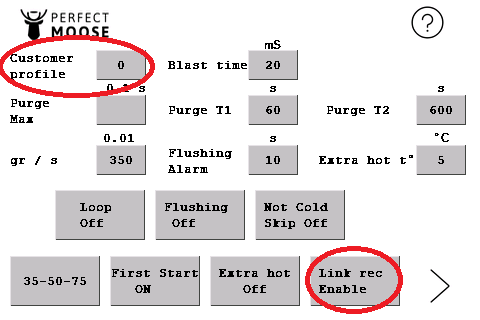
- Go into the setting-menu. Select Customer profile "0" and put the Link rec on "enable"
- Go to the welcome screen by exiting the menu
- Program all your pitchers one by one by placing an empty pitcher on the pitcher holder and select "adjust recipe" to program the texture and temperature of the frothed milk/m*lk on the pitcher
 Can I adjust texture and temperature of the microfoam?
Yes, by clicking here you can see the manual to adjust the recipe that is programmed on your pitcher.